


Angeleyes MD-205 Portable 200W 1920x1080 HD Electronic Eyepiece USB2.0 Plug and Play for Astronomical Telescopes
Verfügbarkeit für Abholungen konnte nicht geladen werden

Specifications
Brand
Product type
Technical specs
Design and durability
Key Features:
- Real 200W high-definition pixel
- USB interface for high-speed transmission
- High resolution sensor
- Supports connection to computers, tablets, and mobile phones (for Android)
- Plug and play, easy to use, clear and smooth images, capable of real-time video acquisition
Specification:
- Model: MD-205
- Resolution: 1920 x 1080
- Chip type: high resolution image sensor
- USB interface: USB2.0 drive-free
- Net weight: 0.1kg
Details:
- Full frame astronomy: plug and play, easy to use, clear images, and easy access to images and videos.
- Ultra long data cable interface, multiple connection methods: supports multiple connection methods for computers, tablets, and mobile phones (Android), enabling real-time video acquisition, relieving the hassle of staring at the eyepiece, allowing multiple people to watch, and saving videos.
- The 200W pixel electronic photosensitive element produces clear and high-quality images with better results.
Package Included:
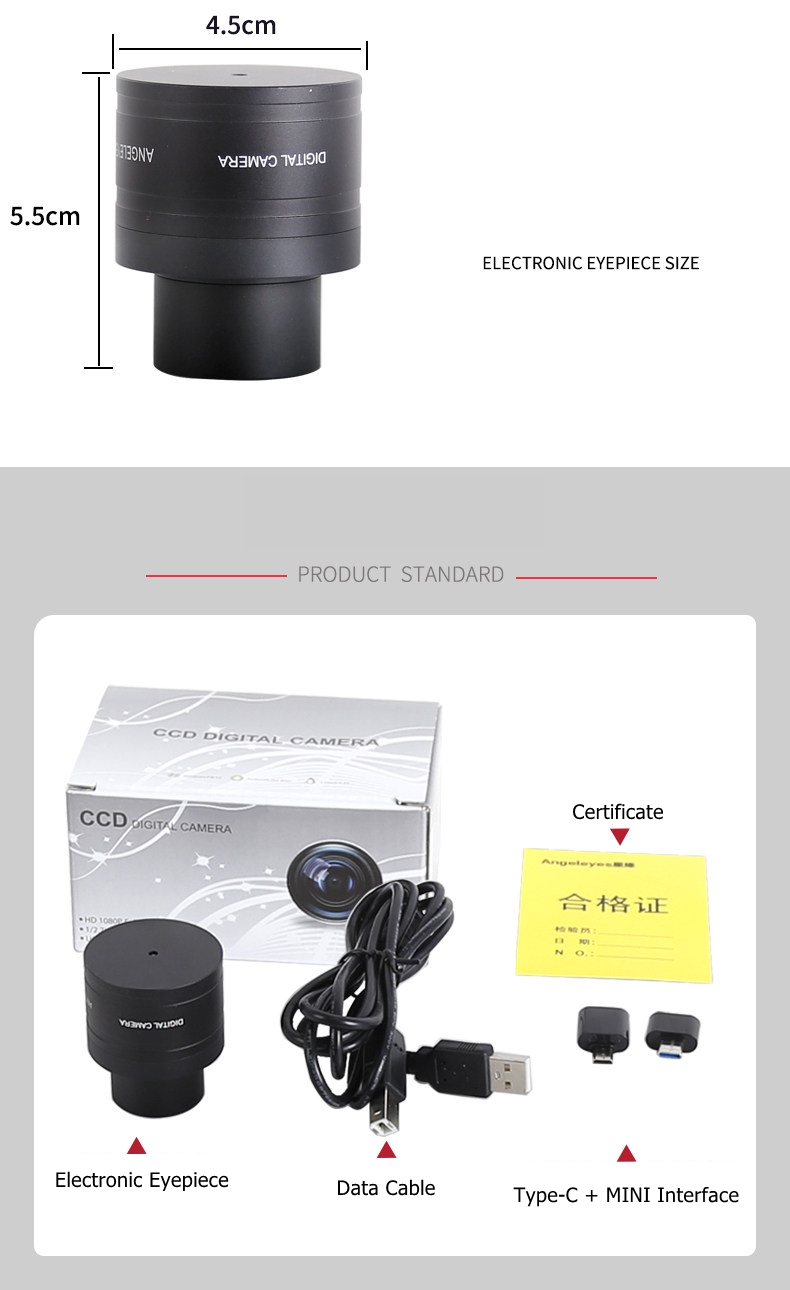
- 1 x Eyepiece
- 1 x Data Cable
- 1 x Type-C Interface
- 1 x MINI Interface
Computer Adjustment Method for Electronic Eyepiece:
Method 1:
- After installation, plug the other USB port into the computer, open "My Computer", "Video Devices" - the image will appear. (Alternatively, you can use the video software we provide).
Method 2:
1. After decompressing the video software, install it directly according to the default method. After installation, double-click the icon "S-EYE" of the video software;
2. On the opened "S-EYE", click on "USB2.0 CAMERA" in the upper right corner. For laptops and other devices with built-in cameras, the camera needs to be turned off.
Method for Detecting Electronic Eyepieces:
- Computer: Video software - double-click to open - on the opened "S-EYE", click on "USB2.0 CAMERA" in the upper right corner - a screen appears - cover the camera with your hand - the screen turns black - remove your hand - the screen turns bright - it means there is no problem.
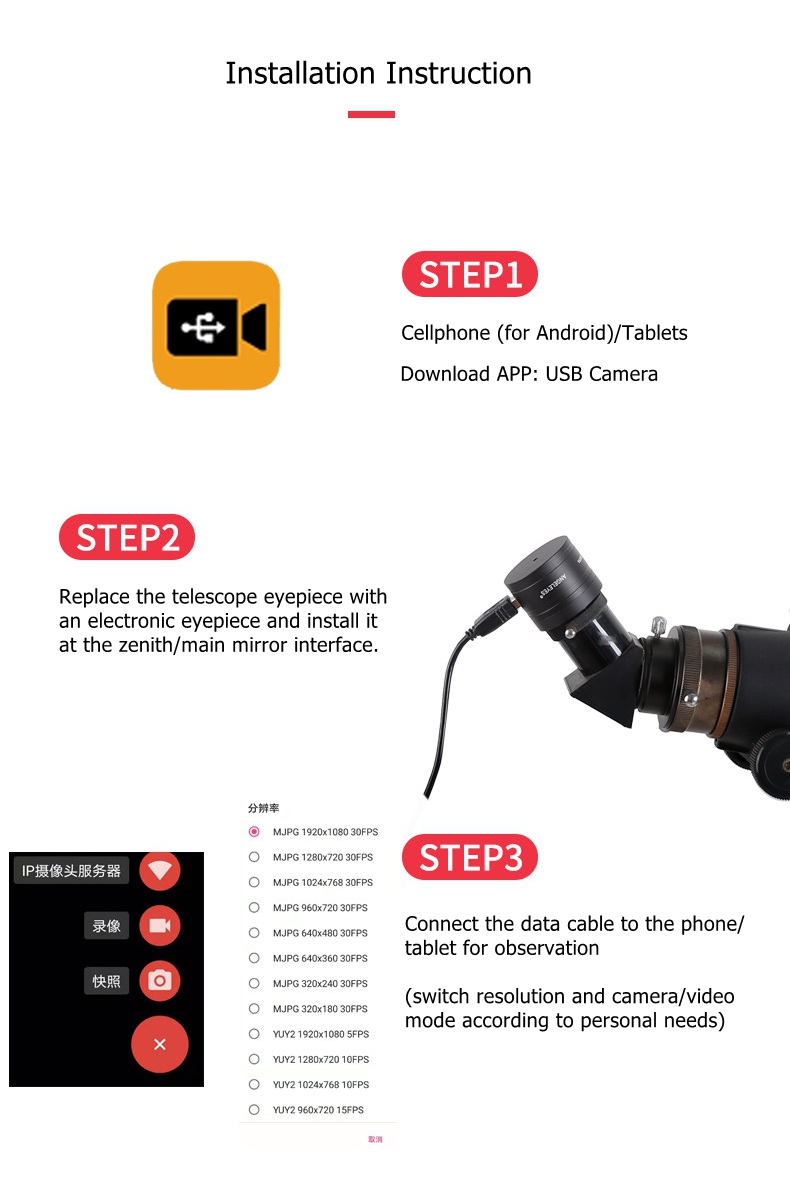
- Mobile phone (for Android)/tablet: Click on the USB camera - the screen appears - cover the camera with your hand - the screen turns black - remove your hand - the screen turns bright - it means there is no problem.
Astronomical Telescope Adjustment Method: Adjust the focusing handwheel to adjust its clarity.
- First, use a regular eyepiece to find the target, fix the approximate direction, replace it with an electronic eyepiece, and then slowly focus. The focal position of the eyepiece is different from that of the electronic eyepiece. So using an eyepiece can see the target, removing the eyepiece and replacing it with an electronic eyepiece is no longer aimed at the target. So we need to be patient and slowly search. After adjustment, the target image will be clear.
- For example, when installing the eyepiece, the focus is on the moon at night, but after replacing it with an electronic eyepiece, you may find that the electronic eyepiece displays black on the computer and cannot see the moon.
- The reason is that when the eyepiece is mounted on the zenith mirror, it is fixed with screws. At this time, the center line of the eyepiece and the center of the zenith mirror do not coincide, and the degree of deviation varies depending on the gap between the eyepiece and the zenith mirror. After replacing the electronic eyepiece, this gap changed, resulting in this situation. This is normal, just readjust it.
- Businesses may need to employ various types of legal pages on their websites or mobile apps. Some, like Privacy Policies, are required by law, while others, such as a Terms and Conditions agreement (T&C), are not. Regardless of legal demands, you may find that your company needs one or more legal pages for compliance and optimal operation.
- In this article, we will go over the most common legal pages, walk you through a summary of what each requires, and explain why you may need it. In addition, you'll find a sample template for each type of legal page so you can quickly get started writing your own.
If you have any questions about this product, please let us know by filling out the form below, and we will contact you as soon as possible.